
Preface
What started out as a fun experiment with Golang HTTP client, ended up with Linux Kernel lessons. Don’t skip the last part of the post.
TL;DR
Tune your
MaxIdleConnsPerHostin your Go HTTP Client - if you use HTTP/1.1 (or check anyway, you never know what you will learn)Linux Kernel port assignments get slow (and uses a lot of CPU) if you opened & closed too many connections too quickly
Background
Last year I wrote about the (since fixed) GOMAXPROCS performance penalty in Kubernetes. You can check out the post here

This time around, I was looking at some random benchmark opportunities (as one does on a Tuesday night) and I saw that Go’s HTTP client has a constant called http.DefaultMaxIdleConnsPerHost which has the default value of 2.
As the name rightly indicates, it is the maximum number of idle connections per host (we love some appropriately named variables, don’t we?)
Max Idle Connections Per Host
When a client makes an HTTP connection to a server, it has to do a TCP handshake, and it is a slightly expensive operation. So, idle connections allows us to have more of such connections that are ready to use without that overhead.
DefaultMaxIdleConnsPerHost sets the maximum number of such idle connections (2 by default).
HTTP/1.1 vs HTTP2
On HTTP2, this is not a big problem since the same connection is used to carry multiple requests. But on HTTP/1.1, this is a problem because a connection carries one request at a time. So if there are 8 requests in flight, you need 8 connections
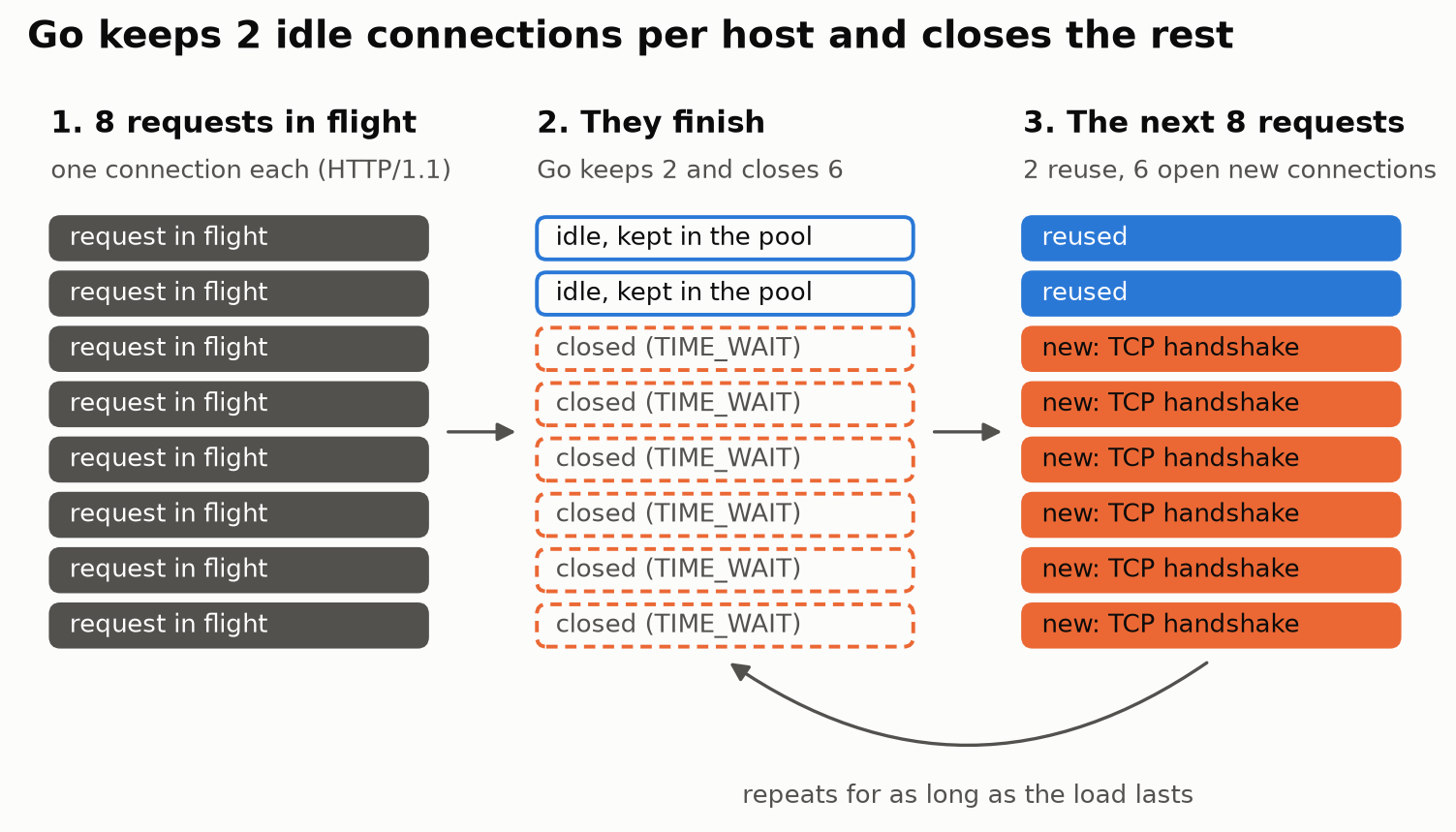
But is that even going to make a difference?
I don’t know, let’s find out. (Spoiler - it does; at least in my benchmark)
The Benchmark
Setup
Server:
Dedicated Linux VM running on a dedicated physical machine (nothing else runs on it)
Has 4CORES but 1 CPU CORE limit set on
docker run
Client
A separate Linux VM (on a different host) with nothing else on it.
Has 4 CPU COREs
Code: Simple go server and client
The client spawns goroutines as “workers”. Each goroutine waits for its response before sending the next one. So
workers = requests in flightWhat the server does: GET / returns a fixed 1 KiB body, with no delay and no TLS. It’s plain HTTP/1.1.
Go version 1.26.1
The Run:
5 s warmup, then 30 s measured, one run per worker count.
Cooldown: between runs, waited for the client’s closed sockets (TIME_WAIT) to clear
Results - Default HTTP Client
client := http.DefaultClient(Artisanally crafted code - I can still do this for a single line)
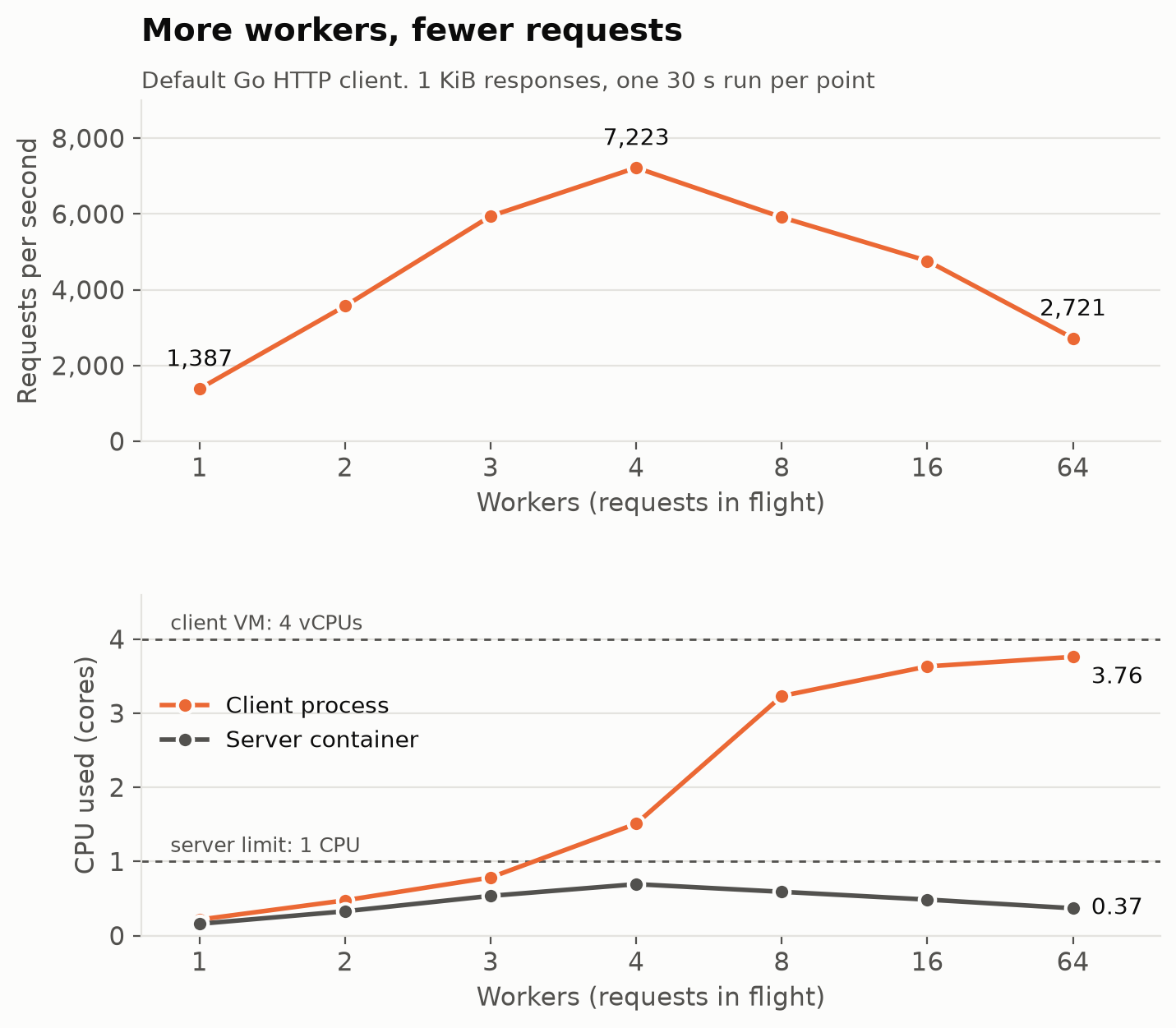
With the default HTTP client, the RPS increased linearly as the number of workers (goroutines) increased up until 4. But it went downhill from there. The CPU usage on the client side kept going up as well.
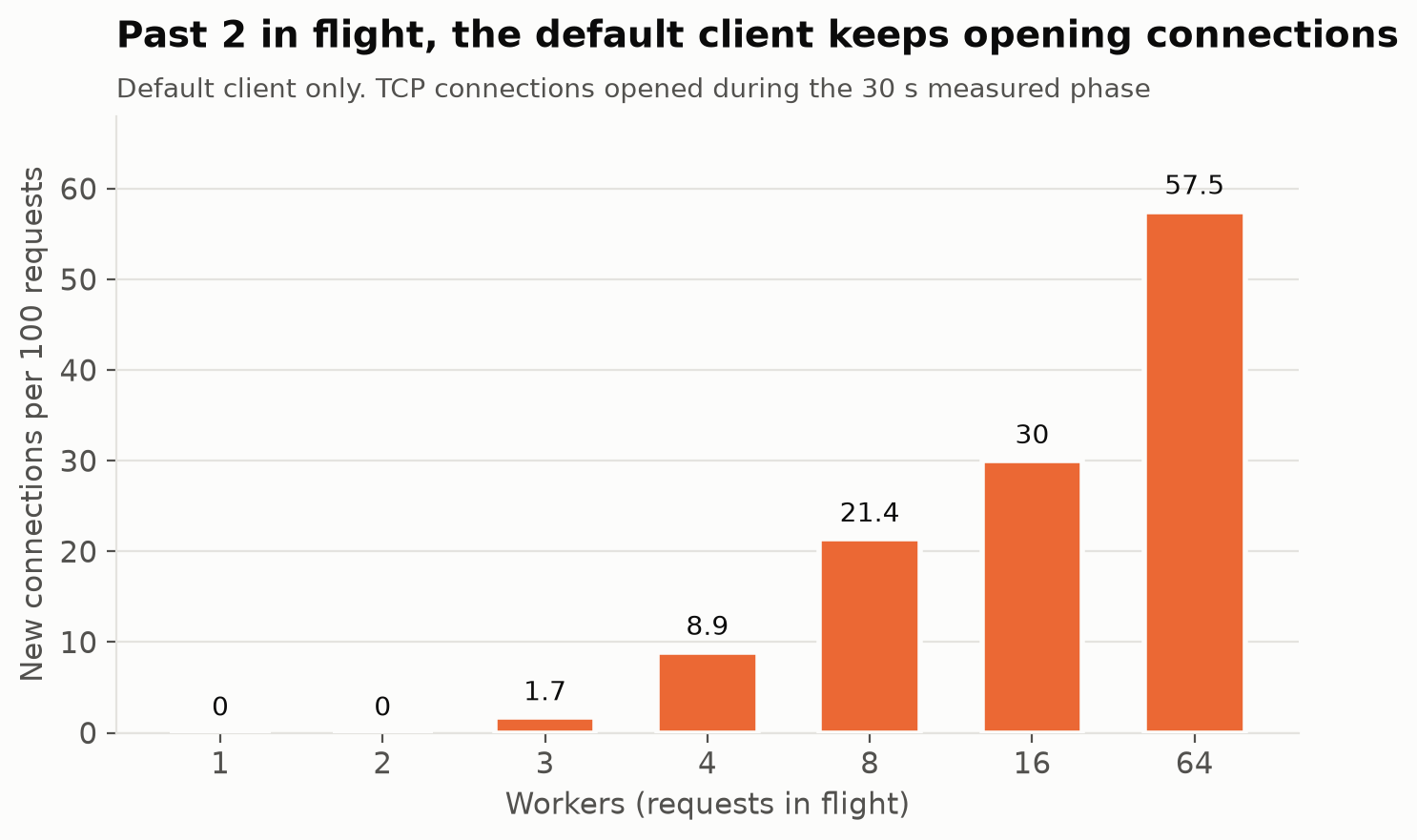
We did expect that to happen, but it is always good to see it visually. So what happened here is that as the number of workers increased, it had to keep opening new connections for more and more of its request and it adds up pretty quickly. Take a look at the new connections per 100 requests
Results - with MaxIdleConnsPerHost increased
I decided to set the MaxIdleConnsPerHost to the number of workers.
tr := http.DefaultTransport.(*http.Transport).Clone()
tr.MaxIdleConnsPerHost = workers
client := &http.Client{Transport: tr}
Clone() is used to let Go keep every other defaults so we are changing only one thing.
And, as expected, the client performed significantly better (it stopped wasting CPU).
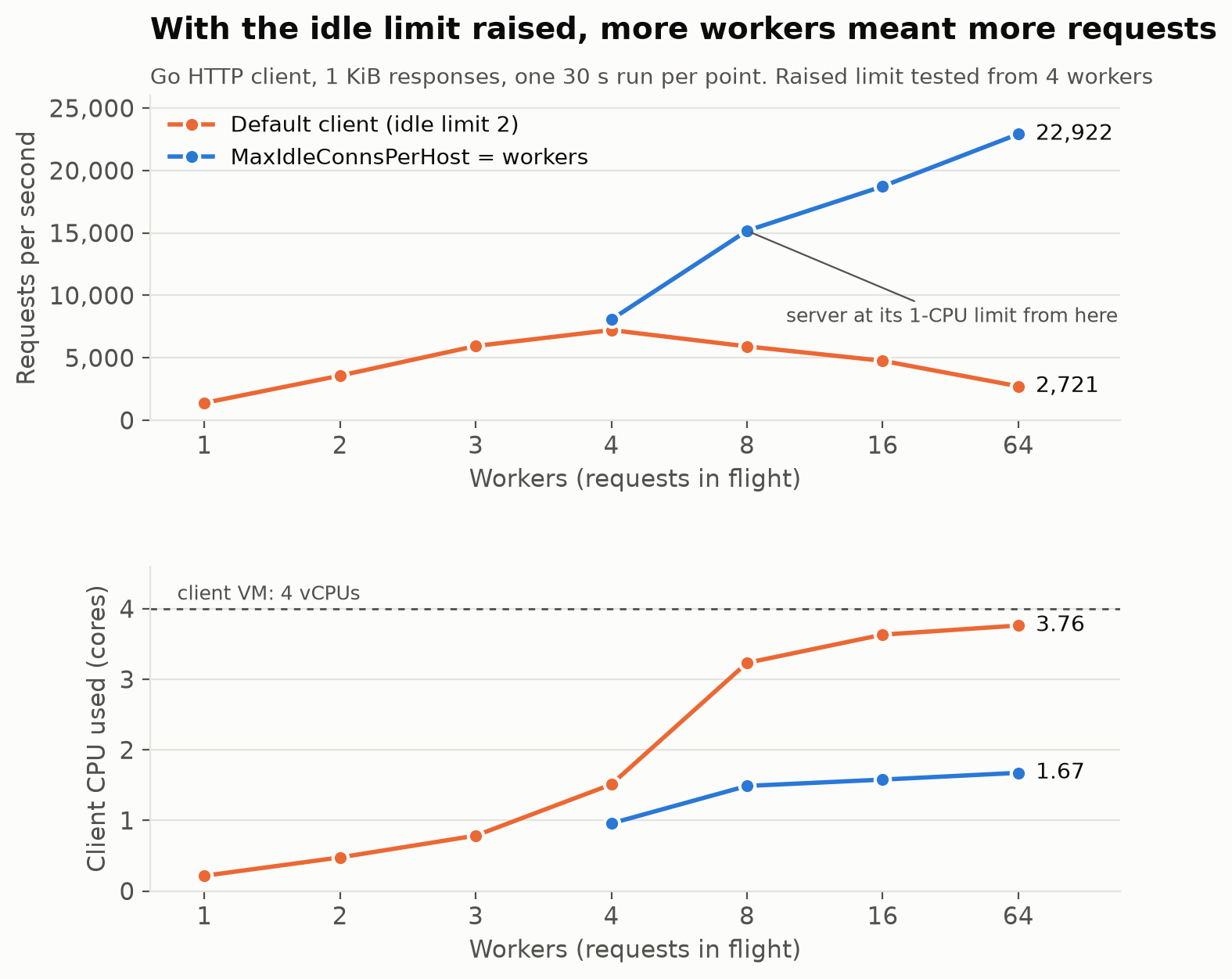
At 64 workers, the throughput went from 2721 req/s → 22922 req/s (about 8x improvement). The client also used less than half the CPU.
And of course, the new connections dropped to 0 at every worker count.
Where did the CPU go?
Looks like all of it went to the Kernel.
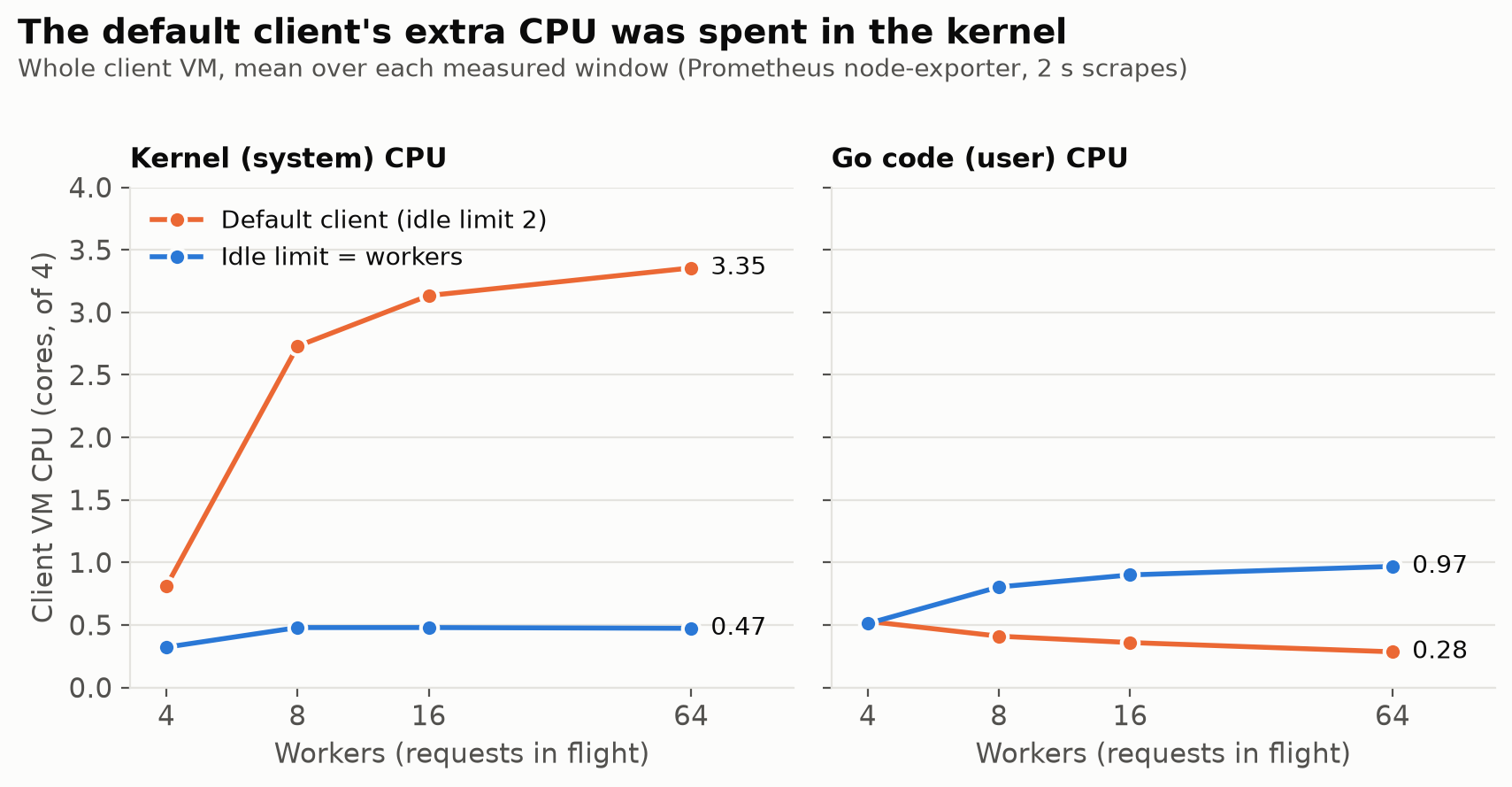
At 64 workers, on the default client, the Kernel was using 3.35 cores and the actual go code was using only 0.28 cores. Whereas on the fixed client, Kernel was using only 0.47 compared to 0.97 by go.
For each new connection, the kernel had to:
Create a socket
pick a free local port
send the handshake
close it and keep the closed socket around for a bit
This is supposed to be cheap, but in this case it is not so cheap.
Trying to find the culprit
Opening a TCP connection should not cost 3 cores and a leg. It should be faster than that. Installed the good ol perf apt install linux-perf) on the client VM and ran perf as the test was running
perf record -a -g -F 99 -- sleep 20   # all CPUs, with call stacks, 99 samples/s
perf report --no-children --sort sym
Most of it (85% of the CPU on the client) was spent on the connect() → __inet_hash_connect. which is the function that picks a free local port for a new outgoing connection.
So what really happened?
Every outgoing connection needs a local port on the client. And every time a connection is closed, the port is held in a TIME_WAIT state for 60 seconds.
Let’s do the math here (thanks Claude for all of this btw).
At 64 workers, the default client opened and closed about 1600 connections a second
But as we know, each closed connection holds the port for 60 seconds. So, 1600x60 = 96,000 ports wanted at once
The client has port range 32768 to 60999 = 28,232 ports
But it wanted more than 3x as many ports exist
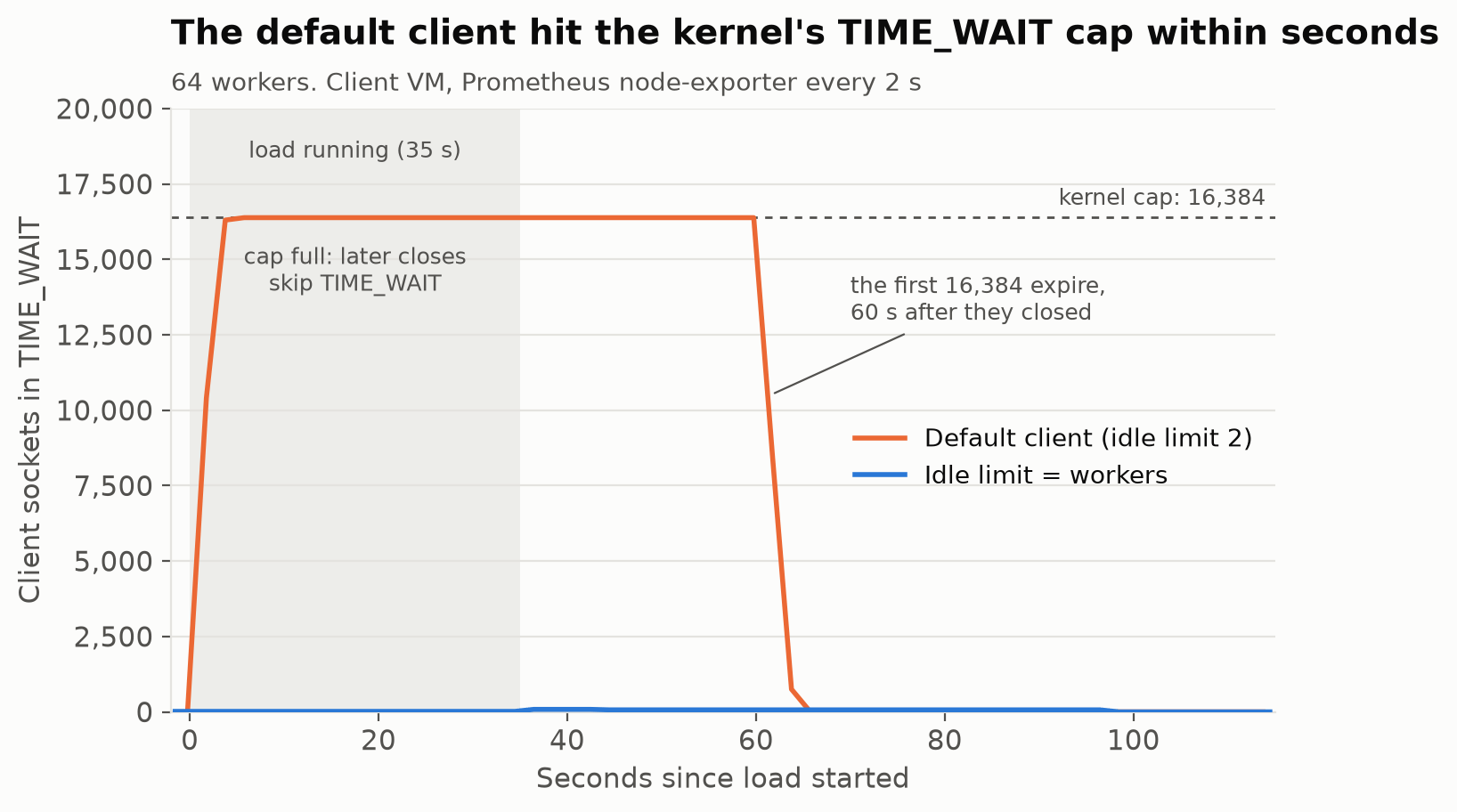
The kernel won’t keep more than 16,384 closed sockets around. It is a cap in the kernel params
net.ipv4.tcp_max_tw_buckets).Anything closed after that skips TIME_WAIT, and its port is free right away.
What is wrong with a full TIME_WAIT ?

Ok, this is a fun one.
So the client hit the 16k closed sockets quickly, which left about 12k free ports (28k total ports -16k already full)
Now, the Linux Kernel has a thing with the
connect()syscall. By default it tries to find an even numbered open port first. Because the kernel prefers even ports, the first 14k closed connections took every even port. So, all of 12k free ports are odd numbered.So for every new connection, the Kernel has to check all 14k even ports, finds nothing free, and then move on to the odd one — so it had to do that 1600 times a second (that is over 20 million port checks a second)
Conclusion
I set out to see whether a constant that sets the max idle connections per host on the go http client makes a difference in performance. And as expected, it did, and not for the reasons I would have ever imaged (or known). It ended up being a good lesson in Kernel internals and networking. AI (Claude code in this case) has been an excellent tool for learning and exploration.
Oh, and check your Go http client configuration anyway — set the MaxIdleConnsPerHost anyway, it does not cost much (or ask your agent to check it)